
Managing and Submitting Your Applications
The Application Dashboard (Antrags-Dashboard)
When you have completed the five-step input process, click Application Dashboard at the bottom of the page. Raumsonde performs a preliminary check based on the details you have entered and advises which permits are likely to be required for your event at the chosen location.
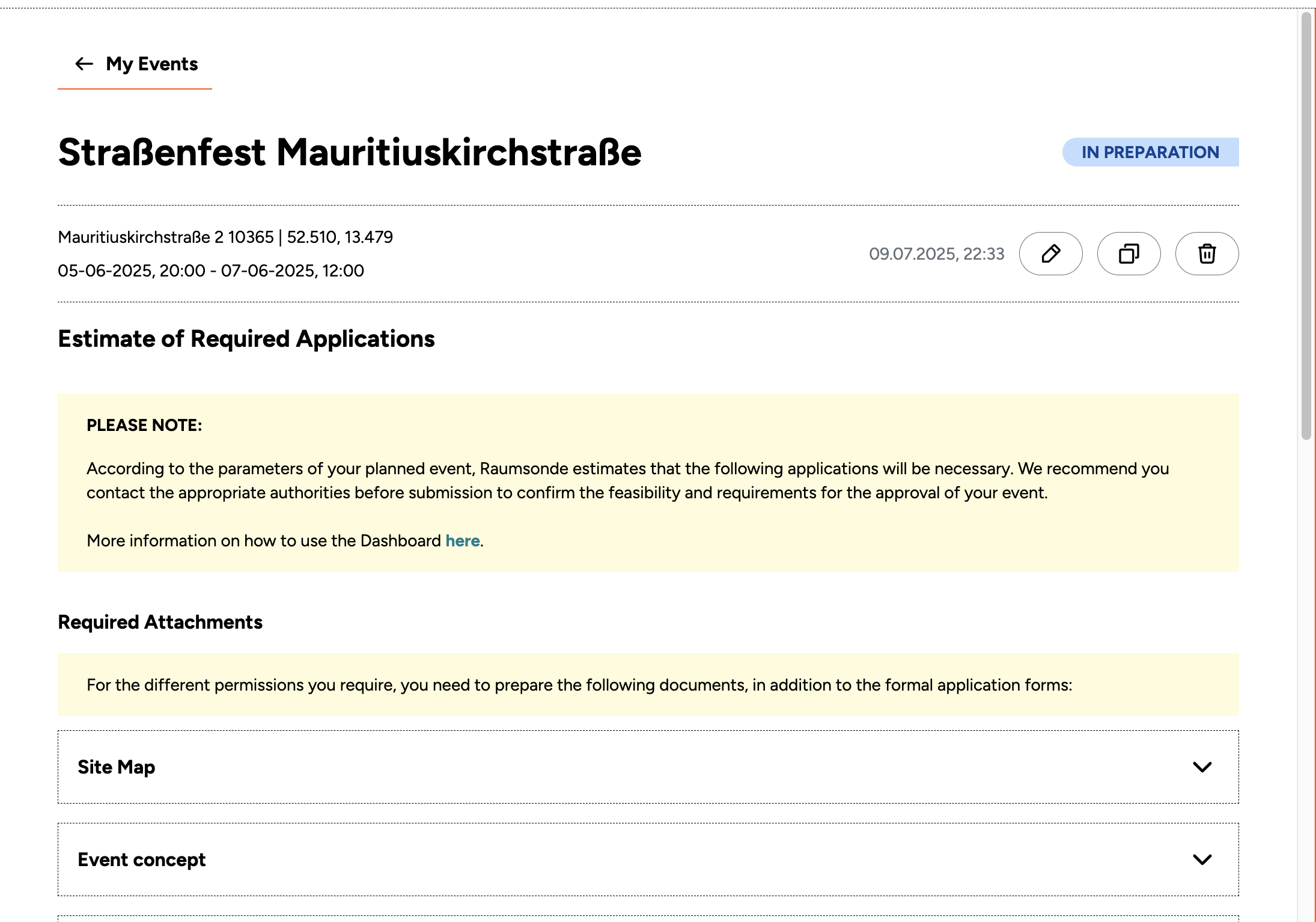
If any details from the previous steps are missing or incomplete, the number of missing fields is shown in red on the top right-hand side of the page. Click the pen icon beside it to return to the questionnaire, where missing fields are highlighted in red. All your inputs are saved automatically and can be updated at any time. All information associated with your event is also saved in the My Events section of your User Profile.
Required Attachment Documents
The Required Attachments section lists all the supporting documents you need to prepare alongside your formal application forms. Each document is shown as a collapsible panel – click on any item to expand it and see the required actions.
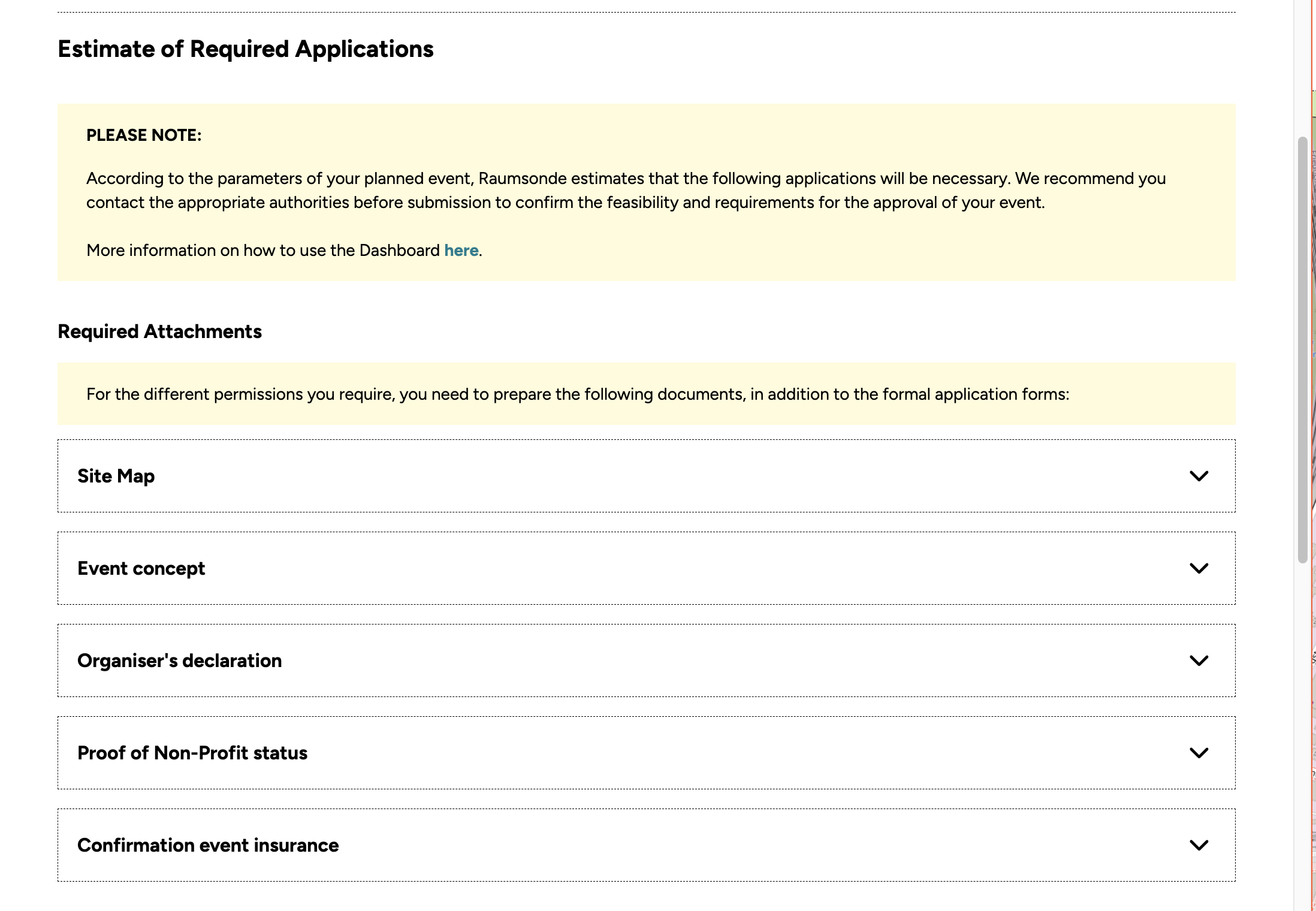
Depending on the document, the expanded panel may include:
- A Download PDF link to generate and download a pre-filled form from Raumsonde, which you then print and sign.
- An email action to send the signed form to the responsible authority.
- A note that the document can be submitted at a later stage.
Some documents need to be obtained or completed by third parties. For example, the Confirmation event insurance form must be downloaded from Raumsonde and passed to your event insurer for completion and signature. Other documents, such as Proof of Non-Profit status, cannot be generated by Raumsonde – you will need to obtain these from your own records or the relevant issuing body and include them with your application.
Note: For more information on insurances (Veranstalterhaftpflichtversicherung), please refer to the Guide on Safety & Insurance
On the right-hand side of each action, a Check if done checkbox allows you to track your progress. Tick each item as you complete it to keep an overview of which documents are ready for submission.
Required Permits
Below the Required Attachment document list, the Application Dashboard shows the permits for which you are likely to need to apply. For each permit, you will see:
- The application form required – for certain permits, Raumsonde can generate this directly from your inputs. Click the download field to produce a pre-filled PDF form.
- The required attachments from the list above that need to be appended to each application.
- The responsible authority, including contact information for consultation and questions.
- Links to external online services, where dedicated digital application portals already exist.
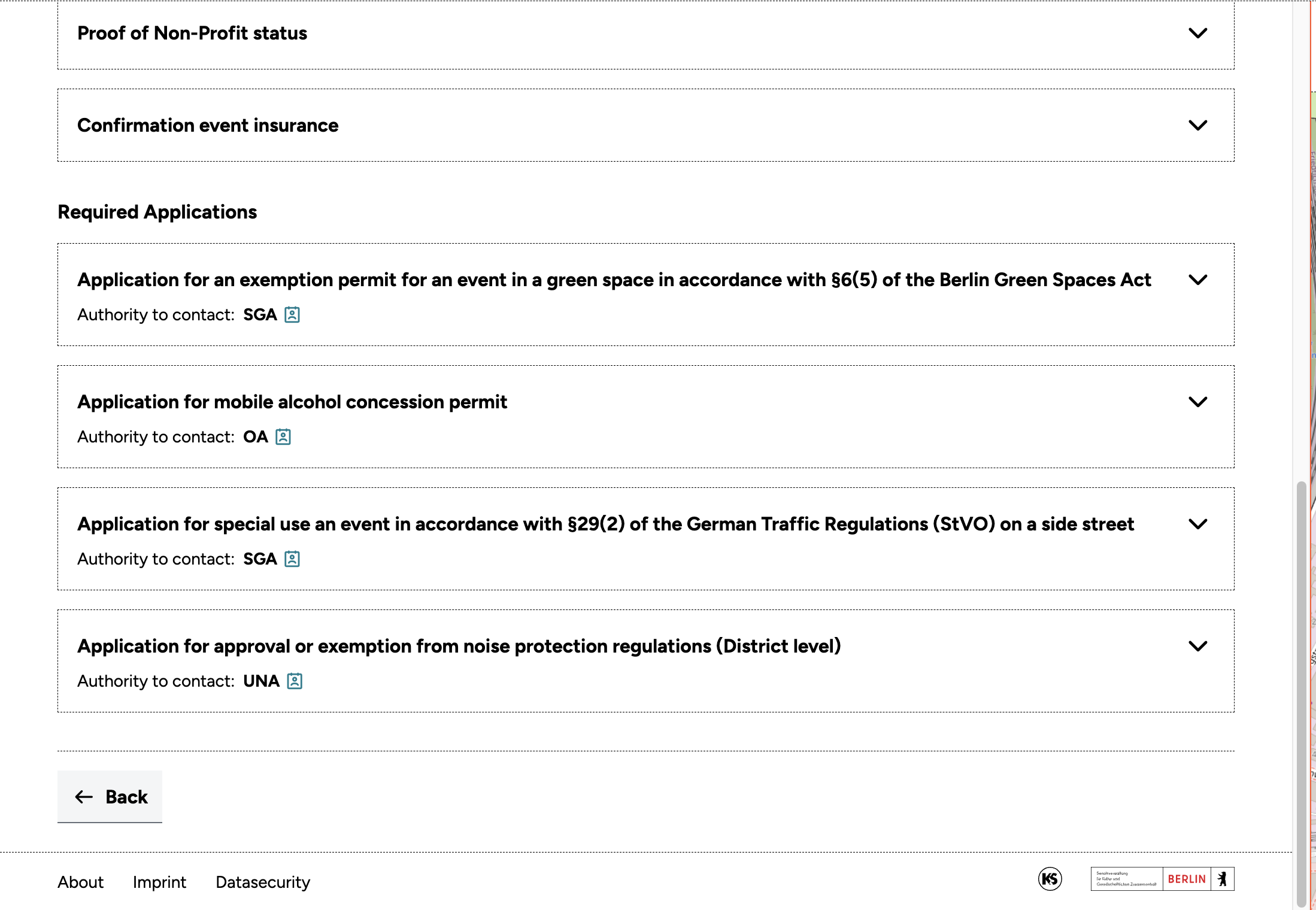
For permits where Raumsonde generates an application form, it can also prepare an email template addressed to the correct authority. Attach the application form and associated documents, and send. It is generally a good idea to contact the responsible authority in person before submitting any application, to make sure there are no factors you may not be aware of that could affect approval. It is common for a single event to require multiple permits from different authorities – for example, a special use permit from one office, a noise protection exemption from another, and possibly a traffic order from a third. Each permit may have its own application form, its own set of required attachments, and its own point of contact. Be prepared for this from the outset and use the Check if done checkboxes and status tracking features in the Application Dashboard (see Section Tracking Your Permit Status) to stay on top of each submission.
Submitting Your Applications (Antragsstellung)
The Application Dashboard provides an overview of which permits your event is likely to require and which authority is responsible for each. Each permit is shown as a collapsible panel – click on any item to expand it and see the required actions.
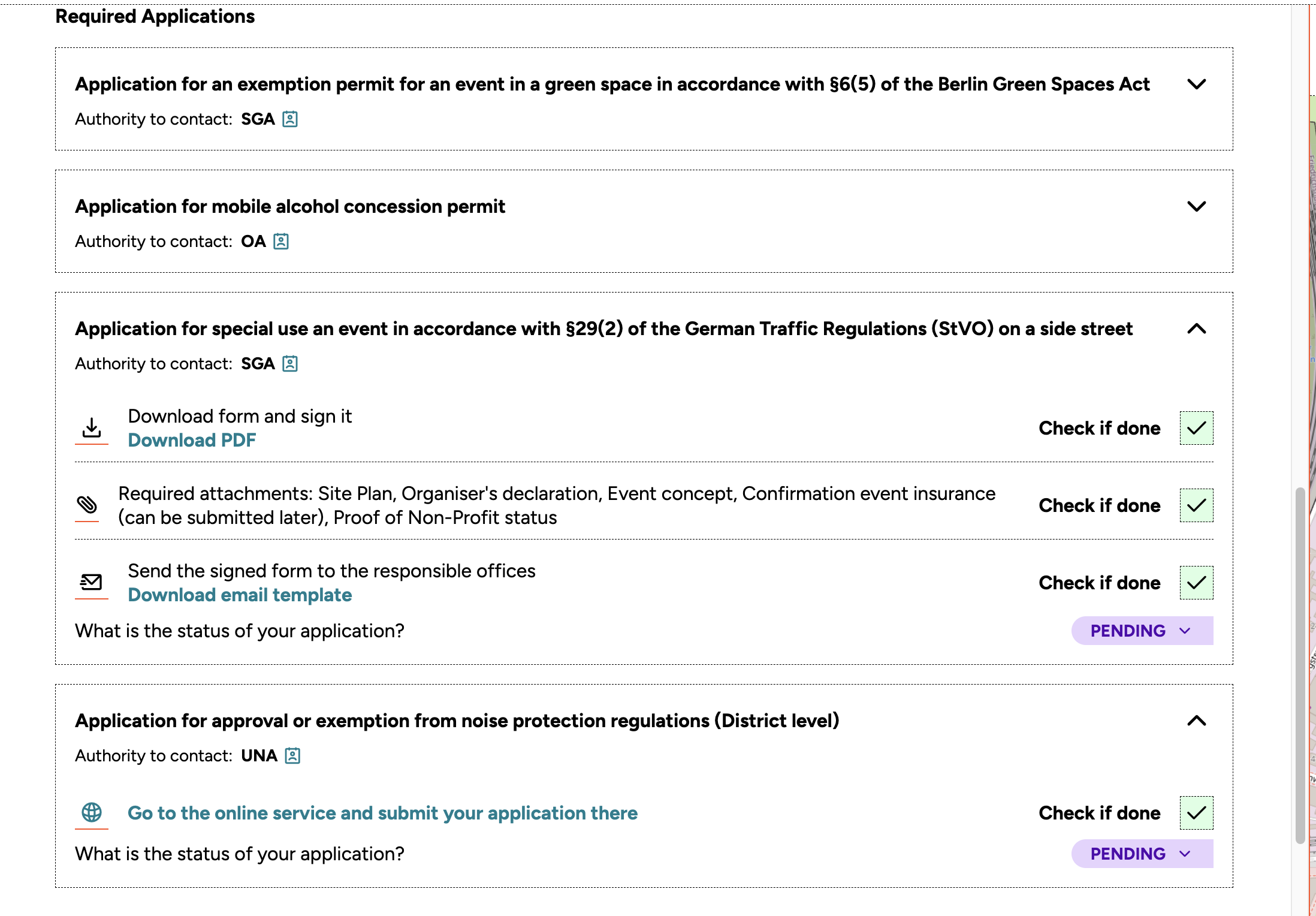
There are two types of submission process, depending on the permit:
- Online services – For certain permits, digital application procedures are already available from the city of Berlin. Where this is the case, the permit panel includes a Go to the online service and submit your application there link, which takes you directly to the relevant portal. At present, Raumsonde does not transfer your inputted information directly into these external services, but this capability is planned for future development.
- PDF forms via email – For permits where standardised digital services are not yet available – such as special use permits (Sondernutzungsgenehmigung), waivers for events on protected green space, or permits for the use of certain pyrotechnics – application forms can be generated from your inputs through Raumsonde.
The permit panel in Raumsonde will show:
- A Download PDF link to generate the pre-filled application form. Download it, print it, and sign it.
- The list of required attachments that need to be included with the application.
- A Download email template link, which generates a pre-addressed email to the responsible authority with the correct formal salutation. Attach the signed application form and all required documents, and send.
For each permit, the responsible authority is displayed directly beneath the permit title (e.g. "Authority to contact: SGA"), along with a link to their contact details. You can also find a full list of relevant authorities on a dedicated section of the Support Center. In addition to the application forms, some of the required supporting documents can also be generated directly by Raumsonde from the details you have already entered.
Hint: We strongly recommend contacting the responsible authority before submitting your application. A brief conversation can help clarify specific requirements, flag potential issues early, and ultimately speed up the approval process.
Tracking Your Permit Status
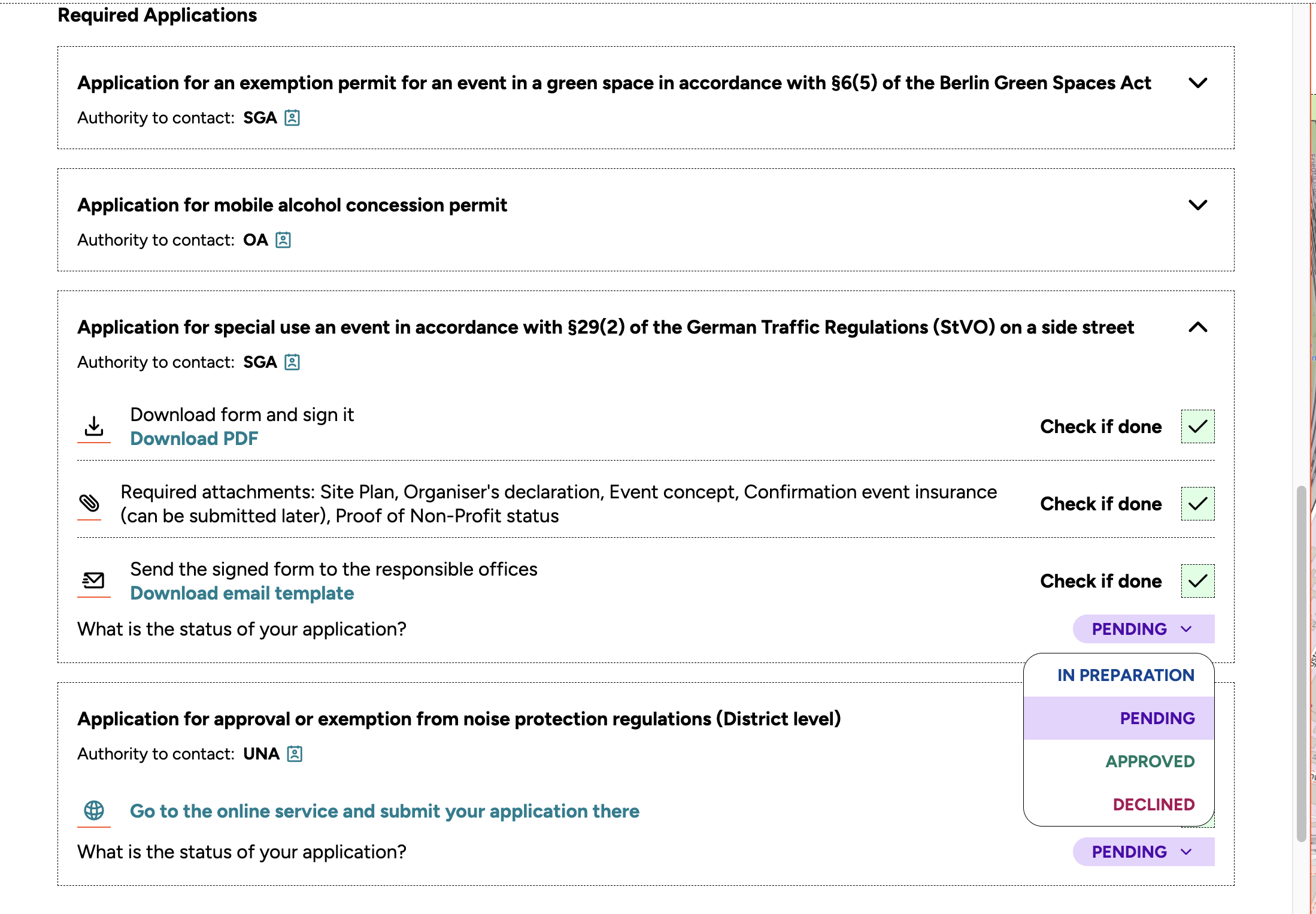
The Application Dashboard includes a status tracking feature to help you keep an overview of all the permits you need to obtain before your event can take place. At the bottom of each permit information box, you will find the line "What is the status of your application?" and a colour-coded dropdown menu in the lower right corner.
The available statuses are:
- In Preparation – You are still working on the application
- Pending – The application has been submitted and is being processed
- Approved – The permit has been granted
- Declined – The application has been rejected
This allows you to track each application individually, identify where follow-up is needed, and ensure everything is in place before the date of your event.
Important Notes on the Approval Procedure (Genehmigungsverfahren)
The permit recommendations provided by Raumsonde are based on a preliminary assessment of the details you have entered. They should be treated as guidelines to help you understand the scope of preparation involved, the authorities you need to contact, and the likely complexity of the process.
There are several things to be aware of:
Administrative discretion
The approval authorities have considerable leeway in deciding what information is required for a particular event and in what detail. The administration deals with a wide variety of applications and a multitude of location-specific factors, and requirements may vary between districts (Bezirke).
Requests for additional information
Depending on the size, location, and complexity of your event, the responsible authority may request further details after receiving your initial submission.
No guarantee of approval
A well-prepared application does not guarantee that a permit will be granted. Conflicts with other permits, protection designations for areas on or around your location, limits on the number of noise-generating events at a given site over a particular period, and other factors may lead to a rejection (Ablehnung), regardless of the quality of your application.
Note: Always make personal contact with the relevant district administration (Bezirksamt) prior to submission to discuss the feasibility of your event, the scope of permits required, and the materials needed. This can save time and help avoid unnecessary delays in the approval procedure.